
YouTube
Connect a YouTube channel and upload videos and Shorts with a title, a description, a privacy setting and the made-for-kids answer YouTube requires.
With YouTube you can upload videos and Shorts to your channel. YouTube shows a square or vertical video of up to 3 minutes as a Short.
Before you connect
- You need a Google account with a YouTube channel. If the Google account has no channel, create one on YouTube first.
- If you manage several channels, Google asks you which account to use when you connect. Choose the one that owns the channel.
Connect YouTube
- In the sidebar, open Accounts.
- Press Connect account and choose YouTube.
- A window opens on Google. Choose the account that owns your channel.
- Allow Linkpost to upload videos and to see your YouTube account. Keep every option on.
- The window closes. The message YouTube channel connected. appears and the channel is listed as a YouTube channel.
Linkpost asks Google for two permissions:
| Permission | What it allows |
|---|---|
youtube.upload |
Upload videos to your channel. |
youtube.readonly |
Read your channel's name and picture. |
Linkpost renews the access by itself, so scheduled videos can go out while you are away.
What you can publish
| Format | Files | Text | Limits |
|---|---|---|---|
| Video | One video: MP4 or MOV | Title up to 100 characters (required). Description up to 5,000 characters. | Up to 512 MB. Up to 12 hours. |
| Short | One square or vertical video: MP4 or MOV | Title up to 100 characters (required). Description up to 5,000 characters. | Up to 512 MB. Up to 3 minutes. |
Shorts
YouTube decides on its own whether a video is a Short. It shows a video as a Short when both of these are true:
- The video is square or vertical: it is not wider than it is tall.
- The video is up to 3 minutes long.
Any other video is a regular video. YouTube has no setting to ask for a Short or to avoid one, so Linkpost cannot change what YouTube decides.
Linkpost tells you what your video will be before you post:
- When you add the video, the form says YouTube will show it as a Short or YouTube will show it as a regular video, with the reason.
- Under Post as, choose Short to be sure. Linkpost then refuses a video that YouTube would show as a regular video, and nothing is uploaded.
- With Video, Linkpost uploads any video. If YouTube will show it as a Short, Linkpost lists the post as a YouTube Short.
A video filmed with a phone held upright counts as vertical.
Title, description and privacy
Every YouTube upload needs:
- Title: up to 100 characters. It is required.
- Description: the main text of the post, up to 5,000 characters. Hashtags work here. In the multi-account composer, the main text becomes the description.
- Who can watch it: Public, Unlisted or Private. Public is selected at the start.
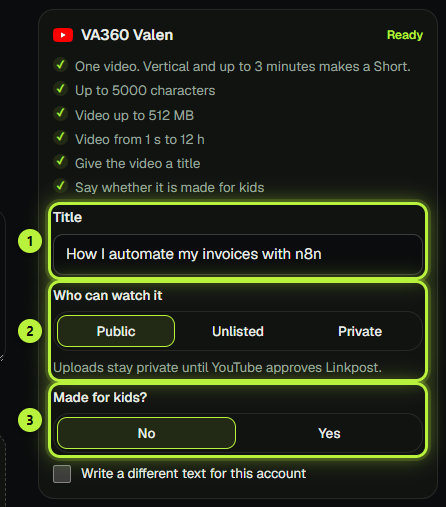
YouTube requires every app that uploads videos to pass an audit. Until Linkpost passes it, YouTube makes all its uploads private. The form reminds you with Uploads stay private until YouTube approves Linkpost.
Made for kids
YouTube requires you to say whether each video is made for kids. The law in the United States (COPPA) requires this answer. Choose No, it's not made for kids or Yes, it's made for kids (in the composer: No or Yes under Made for kids?). Nothing is selected for you, and you cannot publish until you answer.
Category
Linkpost uploads every video in the People & Blogs category. You can change it afterwards in YouTube Studio.
After you post
YouTube processes each video after the upload. The post's page shows Uploading to YouTube, then Published once YouTube has the video. YouTube may need more time before the video can be watched in full quality.
Once the post is published, its page has a Watch it on YouTube button. A Short opens in the Shorts player.
Linkpost does not read YouTube numbers yet. Analytics shows what you published to YouTube through Linkpost and whether it went out. See Analytics.
Disconnect YouTube
On the Accounts page, open Manage on the channel and choose Disconnect. Linkpost cancels its access at Google and deletes its tokens.
If something goes wrong
| Message | What it means | What to do |
|---|---|---|
| This Google account has no YouTube channel yet. Create one on YouTube, then connect again. | The Google account you chose has no channel. | Create a channel, or connect with the Google account that owns it. |
| YouTube did not give Linkpost long-term access. Remove Linkpost in your YouTube settings, then connect again. | Google did not return the access Linkpost needs for scheduled posts. | Remove Linkpost from the third-party access of your Google account, then connect again. |
| Linkpost needs permission to publish to YouTube. Connect again and keep every option on. | You turned off the upload permission. | Connect again and keep every option on. |
| YouTube did not let Linkpost in. Please try again. | Google refused the sign-in. | Try again. |
| Give the video a title. | The title is empty. | Add a title. |
| Say whether the video is made for kids. YouTube requires it. | The made-for-kids question has no answer. | Choose Yes or No. |
| Upload an MP4 or MOV video. | The file is not a supported video. | Export it as MP4. |
| That file is too large for this network. | The video is larger than 512 MB. | Compress the video. |
| YouTube takes videos from 1 s to 12 h. | The video is longer than 12 hours. | Shorten the video. |
| A Short is square or vertical, and this video is wider than it is tall. Post it as a video. | You chose Short and the video is horizontal. | Choose Video, or export the video as square or vertical. |
| A Short lasts up to 3 min, and this video is longer. Shorten it or post it as a video. | You chose Short and the video is longer than 3 minutes. | Shorten the video or choose Video. |
| Linkpost could not read the size or the length of this video, so it cannot promise a Short. Post it as a video. | You chose Short and the file does not say its size or its length. | Choose Video, or export the video again as MP4. |
| YouTube access expired or was revoked. Connect the account again. | Google no longer accepts the access. | Reconnect the channel. |
| YouTube refused Linkpost's access. Connect the account again. | Google refused the access during the upload. | Reconnect the channel. |
| YouTube rejected the post: reason | YouTube refused the upload and gave a reason. | Fix what the reason says, then try again. |
| YouTube asked us to slow down. We will retry shortly. | Too many uploads in a short time. Linkpost retried and gave up. | Use Retry later. |
| YouTube is temporarily unavailable. We will retry shortly. | YouTube did not answer. | Use Retry later. |
For general help with failed posts, see Failed posts.