
Frequently asked questions
Short answers to the questions people ask most about Linkpost, each with a link to the page that explains it in full.
Publishing
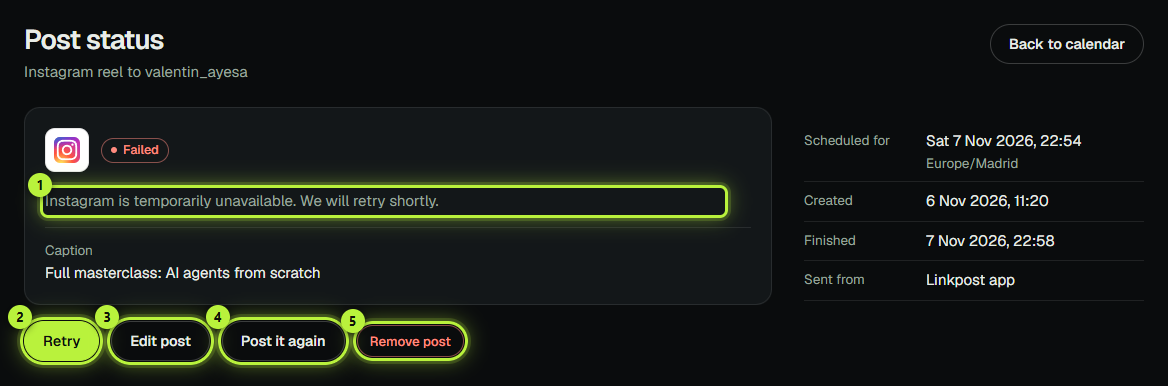
Why did my post fail?
The network refused it, or Linkpost could not deliver it. The reason is on the post's page, on the overview and in the email Linkpost sends you. Common reasons are a file the network does not accept, a text that is too long, or an account that needs reconnecting. See Failed posts and the troubleshooting table on the network's page.
Can I send a failed post again?
Yes. On the post's page or on the overview, press Retry to send the same post again, or Edit post to fix it first. Retry works while Linkpost still has the post's files, which is 24 hours from its scheduled time. See Retry a failed post.
Can I edit a post after it is published?
No. Once a post is on the network, Linkpost does not change or delete it. Edit or delete it in the network's own app.
Can I change a scheduled post?
You can move it to another date or time, or cancel it, until it goes out. You cannot change its text or files: cancel it and schedule a new one. See Scheduling.
Can I post to several accounts at once?
Yes, with the multi-account composer: tick each account under Post to, write once, and Linkpost checks each network's rules. It is pending Meta and TikTok certification and is not available to every account yet. See The composer.
Which formats does each network take?
Every network takes videos. Instagram adds Reels and stories, Facebook adds stories, and text, photos, carousels, documents, polls and threads depend on the network. See the table in Formats and limits.
Why can I not post photos or text to some networks?
Text, photo, carousel, document, poll and thread posts come with the multi-account composer, which is pending Meta and TikTok certification and is not available to every account yet. Until they reach your account, you can publish videos, Reels and stories. See Formats and limits.
How long does a post take to appear?
Usually from a few seconds to a few minutes. Networks process each file before they show it, and videos take the longest. Follow the post's status on its page. See Post statuses.
Which timezone are my scheduled posts in?
The one shown next to the date when you schedule. It starts on the timezone in your settings, and you can change it for each post. Changing your settings later does not move posts you already scheduled. See Timezones.
How far ahead can I schedule?
Up to 90 days ahead, and at least one minute from now. You can have up to 100 scheduled posts waiting. See What you can schedule.
Networks
Why is my TikTok post only visible to me?
Until TikTok approves Linkpost, TikTok only takes posts to the profile of private accounts, and those posts are only visible to you. They stay private after the approval, and you can change who can view each one in the TikTok app. To post for everyone, send the video to your inbox and post it from the TikTok app. See TikTok.
Why does TikTok say it only accepts posts from private accounts?
During the review, TikTok only accepts posts to your profile from accounts set to private. If your account is public, Send to inbox comes selected, and Linkpost refuses a post to your profile before sending anything. Set your TikTok account to private, or use Send to inbox, which works with public accounts. See TikTok.
Why are my YouTube uploads private?
Until YouTube approves Linkpost, YouTube makes every upload private, whatever you choose. Make the video public in YouTube Studio. See YouTube.
Why can I not connect my Instagram account?
Instagram only lets apps publish to professional accounts (Business or Creator). Switch your account to a professional account in the Instagram app, then connect it. See Instagram.
Can I publish to a Facebook profile or group, or a LinkedIn company Page?
Not to a Facebook profile or group: on Facebook, Linkpost publishes to Pages you manage. On LinkedIn, it publishes to your personal profile; company Pages are waiting for LinkedIn's approval. See Facebook and LinkedIn.
Why is a network listed under "Not available on this server yet"?
That network is not set up on Linkpost's server yet, so it cannot be connected. It becomes available without any action from you. See Connect your accounts.
Why do I need my own X app to post on X?
Since February 2026, X charges for every post made through its API, and it sets and changes that price. Linkpost does not want to mark it up or bill it to you at the end of the month. With your own X app, you buy credits in X's console, see there every post you pay for and decide how much to spend. Linkpost charges nothing for X. Creating the app takes a few minutes, once. See X.
Accounts
Why does an account say "Reconnect needed"?
The network no longer accepts Linkpost's access: it expired, or it was removed on the network's side. LinkedIn, for example, gives access for 60 days only. Press Reconnect and sign in again. See Account states.
How do I disconnect an account?
On the Accounts page, open Manage on the account and choose Disconnect. Linkpost deletes its tokens at once, and its posts that have not gone out fail. See Disconnect an account.
Does Linkpost store my social media passwords?
No. You sign in on each network, and the network gives Linkpost an access token, stored encrypted. For Bluesky, you give an app password, which Linkpost uses once and does not keep. See Privacy and data.
Data and privacy
How long does Linkpost keep my files?
Until the post goes out or you cancel it: then they are deleted at once. A failed post keeps its files for 24 hours from its scheduled time, so you can retry it. See How long files are kept.
How do I delete my data?
Delete your account in Settings, Account, Delete my account and data. To delete only some data, disconnect an account, remove a failed post or delete a report. See Privacy and data.
Your account
Is there a limit on how many posts I can publish?
Not with the new pricing: posts have no monthly limit, and you pay for the connected accounts beyond the first 2. On X, X charges each post to your own X app, and Linkpost charges nothing for it. On accounts that still have plans, it depends on the plan. An account that was never assigned a plan has no limit, and a plan can limit your monthly posts and your connected accounts. Everyone can publish from the web app up to 3 times a minute and 30 times a day. See Pricing and billing.
I lost my phone with my authenticator app. What do I do?
Sign in with one of your recovery codes: press Use a recovery code instead on the two-factor page. Then set up two-factor authentication again on your new phone. Without recovery codes, contact Linkpost support. See Security.
Why did I not get an email about a failed post?
Check that Publishing problems is ticked in Settings, Account, Email notifications. Linkpost also sends at most one email per account each hour, and none when you caused the failure, for example by disconnecting the account. See Email notifications.
Why are some analytics empty or locked?
Some networks do not give Linkpost certain numbers yet. Instagram reach, Facebook views and every TikTok number wait for the networks' approval, and Linkpost does not read YouTube, LinkedIn, X, Bluesky or Telegram numbers yet. Follower growth also needs two daily readings. See What each network provides.
Can I publish from my own code or an AI assistant?
Yes. Create an API key under Developers, API in the sidebar. Use it with the REST API or connect an AI assistant to the MCP server. See the developer guide and the MCP server guide.
Can an agency or a teammate manage my account?
Yes. In Settings, Team, invite them by email and choose what else they can do: connect or disconnect accounts, use automations and the WhatsApp inbox, or see your billing. They work with their own Linkpost account and switch to yours from the sidebar, and you can take their access away at any time. If you manage other people's accounts, the same tab lists them. See Agency mode and team.
Help and feedback
How do I contact Linkpost support or send an idea?
Press Feedback and support at the bottom of the sidebar. Choose Idea or suggestion, Something isn't working or I need help, write your message in your own words and press Send. Linkpost also sends the page you are on, so the team can see where it happened. The team reads every message and replies by email to the address of your account. You can send up to 5 messages every 10 minutes.
An AI assistant connected to Linkpost can send it for you too, and a program through the API. See Feedback and support.