
Connect the Facebook Pages you manage and publish videos, stories, photos and text posts to them, with Facebook's limits and the fixes for its errors.
With Facebook you can publish videos and stories to the Pages you manage. Text posts and photo posts are pending Meta and TikTok certification.
Before you connect
- Linkpost publishes to Facebook Pages only. It cannot publish to a personal profile or to a group.
- You need a role on the Page that lets you create content. Facebook only shows Linkpost the Pages where your role allows you to post.
- You sign in with your personal Facebook account, and then choose which of your Pages Linkpost can use.
Connect your Pages
- In the sidebar, open Accounts.
- Press Connect account and choose Facebook.
- A window opens on Facebook. Sign in if Facebook asks you to.
- Choose the Pages Linkpost can publish to, and keep every permission on.
- The window closes. The message Facebook Page connected. or N Facebook Pages connected. appears.
Every Page you choose is connected at the same time and appears as its own Facebook Page on the Accounts page. Each Page counts as one connected account. If there is no room for all of them, Linkpost connects the Pages it can and shows the reason, for example that you need a card for more than 2 connections, or how many accounts your plan allows. See Pricing and billing.
Linkpost asks Facebook for three permissions:
| Permission | What it allows |
|---|---|
pages_show_list |
List the Pages you chose. |
pages_manage_posts |
Publish to those Pages. |
pages_read_engagement |
Read the Pages' posts, followers and reactions, for analytics. |
Page access does not expire. You only need to reconnect if you remove Linkpost in Facebook or lose your role on the Page.
Add another Page later
Connect Facebook again and choose the new Page in Facebook's window. The Pages you already connected stay connected. To stop publishing to a Page, disconnect it on the Accounts page.
What you can publish
| Format | Files | Text | Limits |
|---|---|---|---|
| Video | One video: MP4 or MOV | Up to 5,000 characters | 3 seconds to 15 minutes. Up to 300 MB. |
| Story | One video (MP4 or MOV) or one JPEG photo | No text | Videos from 3 to 60 seconds. Up to 300 MB. At least 540 pixels on the shorter side and 24 to 60 frames per second. Visible for 24 hours. |
| Photos | 1 to 10 photos: JPEG, PNG or WebP | Up to 5,000 characters | One post with all the photos. |
| Text | No files | 1 to 5,000 characters | A link in the text shows its preview card. |
Story video size, shape and frame rate. Facebook's API takes story videos of at least 540 pixels on the shorter side, from 9:16 to 16:9 in shape (width to height) and from 24 to 60 frames per second, encoded as H.264, HEVC, VP9 or AV1. Linkpost checks all of this before uploading, and refuses a story video outside it with a message such as Facebook takes videos from 9:16 to 16:9 in shape (width to height), and this one is 1080 × 2400. Crop it to a shape in between, such as 9:16. Page videos have no such checks: Meta publishes no size or frame-rate limits for them.
Choose Video or Story
A single video can be a Page video or a story.
- In the one-account form, choose under What do you want to publish?: Video (a video on your Page, with a caption) or Story (a video or JPEG photo for 24 hours, without a caption).
- In the multi-account composer, choose under Post as in the Facebook requirements.
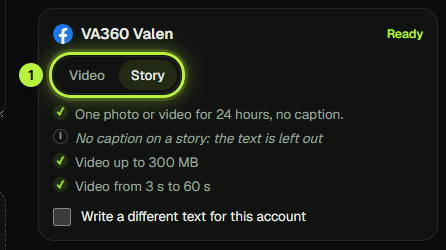
Stories have no text. If you wrote text, Linkpost leaves it out of the story.
Text and photo posts
A text post can carry a link. Facebook builds the link's preview card from the first link in the text.
A photo post can hold up to 10 photos. They appear in the order you set in the composer. Linkpost turns each photo into a JPEG of up to 2,560 pixels on the long side. Facebook does not receive the alt text you write for photos.
After you post
Facebook processes videos before they appear. The post's page shows Uploading to Facebook, then Facebook is processing the video, then Published. It may take a few minutes.
Numbers from Facebook
Linkpost reads each Page's followers once a day, and the reactions, comments and shares of its recent posts. Reactions count as likes. Views and reach need a permission that Meta has not granted to Linkpost yet. See Analytics.
Disconnect a Page
On the Accounts page, open Manage on the Page and choose Disconnect. Linkpost deletes the Page's access token at once.
Facebook does not let Linkpost cancel the access from its side. To remove Linkpost from Facebook too, open Facebook Settings, then Apps and websites, select Linkpost and remove it. Facebook tells Linkpost, and Linkpost removes the Pages connected with your Facebook account and fails their pending posts.
If something goes wrong
| Message | What it means | What to do |
|---|---|---|
| No Facebook Page was shared with Linkpost. Choose at least one Page you can post to. | No Page was chosen, or your role on the Pages does not allow posting. | Connect again and choose a Page where you can post. |
| We need permission to publish to your Facebook Pages. | You turned off the publishing permission. | Connect again and keep every permission on. |
| Meta access expired or was revoked. Connect the account again. | Facebook no longer accepts the access. | Reconnect the Page. |
| This account did not grant the permission needed to publish. Connect it again and accept all permissions. | A permission is missing. | Reconnect and keep every permission on. |
| The video must last between 3 and 900 seconds. | The video is shorter than 3 seconds or longer than 15 minutes. | Trim or extend the video. |
| The video must last between 3 and 60 seconds. | The story video is too short or too long. | Trim the video, or publish it as a Page video. |
| Upload an MP4 or MOV video. | The file is not a supported video. | Export it as MP4. |
| Upload an MP4, MOV or JPEG file. | A story file is not MP4, MOV or JPEG. The multi-account composer turns PNG and WebP photos into JPEG first; the one-account form and the API do not. | Save the photo as JPEG. |
| Facebook takes videos of at least 540 pixels on the shorter side, and this one is W × H. Export it bigger, for example at 1080 × 1920. | The story video is too small for Facebook. | Export it again at 1080 × 1920. |
| Facebook takes videos from 9:16 to 16:9 in shape (width to height), and this one is W × H. Crop it to a shape in between, such as 9:16. | The story video is taller than 9:16 or wider than 16:9. | Crop it to 9:16 and export it again, or publish it as a Page video. |
| Facebook takes videos from 24 to 60 frames per second, and this one has N. Export it at 30 frames per second. | The story video has fewer or more frames per second than Facebook takes. | Export it again at 30 frames per second. |
| Facebook takes videos encoded as H.264, HEVC (H.265), VP9 or AV1, and this one is codec. Export it as an MP4 with H.264. | The story video uses a codec Facebook does not take, such as ProRes. | Export it again as MP4 with the H.264 codec. |
| Facebook could not process the video. | Facebook failed while processing. | Export the video again and send it again. |
| Facebook is taking too long to process the video. | Facebook did not finish in time. | Check the Page before you send it again. |
| Meta is temporarily unavailable. We will retry shortly. | Facebook did not answer. Linkpost retried and gave up. | Use Retry later. |
| Meta rejected the request (code). | Facebook refused for another reason. | Check the file and the text, then try again. |
A Page that another Linkpost user already connected is skipped without a message, and the other Pages you chose are connected. If that Page was the only one, you see No Facebook Page was shared with Linkpost. Ask the other user to disconnect the Page first.
For general help with failed posts, see Failed posts.