
Connect your personal LinkedIn profile and publish videos, text, photos, documents and polls, with LinkedIn's limits, the 60-day access and the fixes for its errors.
With LinkedIn you can publish videos to your personal profile. Text posts, photo posts, documents and polls are pending Meta and TikTok certification.
Before you connect
- Linkpost publishes to your personal profile. Publishing to LinkedIn company Pages is waiting for LinkedIn's approval: LinkedIn only opens company Pages to apps that pass a separate review.
- You sign in with your own LinkedIn account. Posts appear as yours.
Connect LinkedIn
- In the sidebar, open Accounts.
- Press Connect account and choose LinkedIn.
- A window opens on LinkedIn. Sign in and allow Linkpost to use your profile and to post on your behalf.
- The window closes. The message LinkedIn account connected. appears and the account is listed as a Personal profile.
Linkpost asks LinkedIn for three permissions:
| Permission | What it allows |
|---|---|
openid |
Confirm which LinkedIn account you signed in with. |
profile |
Read your name and picture. |
w_member_social |
Post on your behalf. |
Reconnect every 60 days
LinkedIn gives Linkpost access for 60 days and does not let Linkpost renew it. So you need to reconnect your LinkedIn account about every two months.
- 14 days before the access ends, the account shows Access expires with the date on the Accounts page, and Expires soon on the overview.
- When it ends, the account shows Reconnect needed. Scheduled LinkedIn posts fail until you reconnect.
To reconnect, open Manage on the account and choose Reconnect. It takes a few seconds and restarts the 60 days.
What you can publish
| Format | Files | Text | Limits |
|---|---|---|---|
| Video | One video: MP4 or MOV | Up to 3,000 characters | 3 seconds to 30 minutes. From 75 KB to 500 MB. |
| Text | No files | 1 to 3,000 characters | A link shows an article card. |
| Photos | 1 to 20 photos: JPEG, PNG or WebP | Up to 3,000 characters | One post with all the photos. |
| Document | One PDF, PowerPoint (PPT, PPTX) or Word (DOC, DOCX) file | Up to 3,000 characters | Shown as a carousel people swipe through. Up to 100 MB. |
| Poll | No files | The question, up to 140 characters | 2 to 4 answers of up to 30 characters. Open for 1 day, 3 days or 1 week. |
Who can see the post
For every LinkedIn post, choose under Who can see it?:
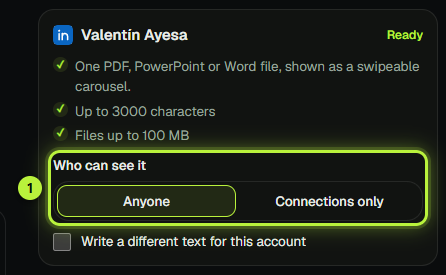
- Anyone: everyone on and off LinkedIn. This is selected at the start.
- Connections only: only your connections.
The choice applies to videos, text, photos, documents and polls alike. Through the API or the MCP server, send privacy_level as PUBLIC or CONNECTIONS. A video needs it; any other post is public when you leave it out.
Links, hashtags and alt text
- Links. When a text post contains a link, Linkpost reads the linked page and adds an article card with its title and image. LinkedIn does not build this card by itself.
- Hashtags. Write them as usual, for example
#marketing. They stay clickable on LinkedIn. - Alt text. The alt text you write for each photo in the composer is sent to LinkedIn, so screen readers can describe it.
Documents
A document post shows each page of the file as a slide that people swipe through. Use a PDF for the most predictable result. LinkedIn has to convert the file first, so the post may stay in processing for a short while. The file must open without a password.
Polls
The text of the post is the question, up to 140 characters. Add 2 to 4 answers of up to 30 characters, and choose how long the poll stays open under Open for: 1 day, 3 days or 1 week. A poll goes without files.
Numbers from LinkedIn
Linkpost does not read LinkedIn numbers yet. Analytics shows what you published to LinkedIn through Linkpost and whether it went out.
Disconnect LinkedIn
On the Accounts page, open Manage on the account and choose Disconnect. Linkpost deletes its access at once. LinkedIn does not let Linkpost cancel the access from its side, so it ends on its own when the 60 days are over. To end it sooner, remove Linkpost from the permitted services in your LinkedIn settings.
If something goes wrong
| Message | What it means | What to do |
|---|---|---|
| LinkedIn access expired. Connect the account again. | The 60 days are over. | Reconnect the account. |
| LinkedIn access expired or was revoked. Connect the account again. | LinkedIn no longer accepts the access. | Reconnect the account. |
| LinkedIn refused Linkpost's access. Connect the account again. | LinkedIn refused the access while posting. | Reconnect the account. |
| Linkpost needs permission to publish to LinkedIn. Connect again and keep every option on. | A permission was turned off. | Connect again and keep every option on. |
| Choose who can see this post. | No visibility was chosen for a video, or the visibility is not PUBLIC or CONNECTIONS. |
Choose Anyone or Connections only. |
| LinkedIn takes videos from 3 s to 30 min. | The video is too short or too long. | Trim or extend the video. |
| That file is too large for this network. | The video is larger than 500 MB. | Compress the video. |
| LinkedIn takes videos of at least 75 KB, and this file has N KB. | The video file is smaller than LinkedIn's API takes. Linkpost checks it before uploading. | Export it again at a higher quality. |
| LinkedIn takes up to 3000 characters (N now). | The text is too long. | Shorten it. |
| LinkedIn polls need 2 to 4 answers. | The poll has too few or too many answers. | Add or remove answers. |
| LinkedIn poll answers take up to 30 characters. | An answer is too long. | Shorten it. |
| Documents can be PDF, PowerPoint or Word files. | The document type is not supported. | Save it as PDF. |
| LinkedIn takes files of up to 100 MB. | The document is larger than 100 MB. | Compress it or split it. |
| LinkedIn could not read the document. Check that it opens and has no password. | LinkedIn could not convert the file. | Remove the password or export it again as PDF. |
| LinkedIn could not process the video (reason). | LinkedIn failed while processing. | Export the video again and send it again. |
| LinkedIn is taking too long to process the video. | LinkedIn did not finish in time. | Check your profile before you send it again. |
| LinkedIn rejected the post: reason | LinkedIn refused the post and gave a reason. | Fix what the reason says. |
| LinkedIn is temporarily unavailable. We will retry shortly. | LinkedIn did not answer. Linkpost retried and gave up. | Use Retry later. |
For general help with failed posts, see Failed posts.