
Bluesky
Connect a Bluesky account with an app password and publish posts with a video, text, photos and threads, with Bluesky's limits and the fixes for its errors.
With Bluesky you can publish a post with a video. Text posts, photo posts and threads are pending Meta and TikTok certification.
Before you connect
Bluesky does not have a sign-in window for apps. Instead, you create an app password in Bluesky and give it to Linkpost. An app password is a separate password for one app. You can delete it in Bluesky at any time, and your main password stays private.
Linkpost uses the app password once, to open a session with Bluesky, and does not keep it.
To publish videos, your Bluesky account needs a verified email address. Bluesky refuses videos from accounts without one.
Connect Bluesky
- In Bluesky, open Settings, then App passwords, and create a new app password. Name it Linkpost so you can recognise it later.
- Copy the app password. It looks like
xxxx-xxxx-xxxx-xxxx. - In Linkpost, open Accounts, press Connect account and choose Bluesky.
- In Handle, enter your Bluesky handle, for example
you.bsky.social. You can type it with or without the@. - In App password, paste the app password.
- Press Connect Bluesky.
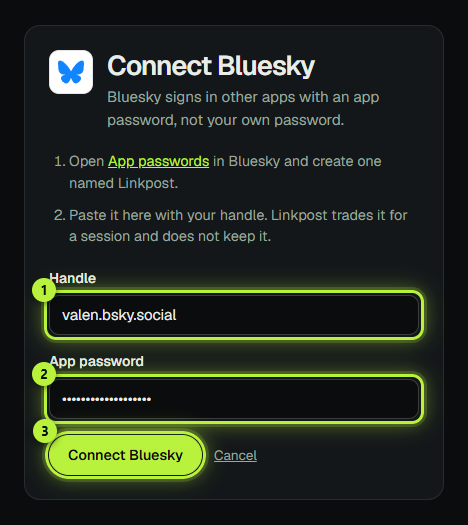
The message Bluesky account connected. appears and the account is listed with your handle.
Accounts hosted outside bsky.social also work: Linkpost finds the server that hosts your account from your handle.
What you can publish
| Format | Files | Text | Limits |
|---|---|---|---|
| Video | One video: MP4 or MOV | Up to 300 characters | Up to 3 minutes. Up to 100 MB. |
| Text | No files | 1 to 300 characters | A link shows a preview card. |
| Photos | 1 to 4 photos: JPEG, PNG or WebP | Up to 300 characters |
Every format can continue as a thread. See Threads.
Photos. Bluesky only takes photos under 1 MB. Linkpost makes each photo smaller until it fits, so you can add photos of any size.
Counting characters. Linkpost counts every character as one. Bluesky counts some characters its own way, so a text right at 300 characters can still be refused by Bluesky.
Links and hashtags
Links and hashtags in your text become clickable on Bluesky. When a text post contains a link, Linkpost reads the linked page and adds a preview card with its title, description and image. Bluesky does not build this card by itself.
Threads
A thread is a series of posts that reply to each other. In the multi-account composer, the Bluesky requirements show Add a post to the thread. Each press adds one more post under the first one.
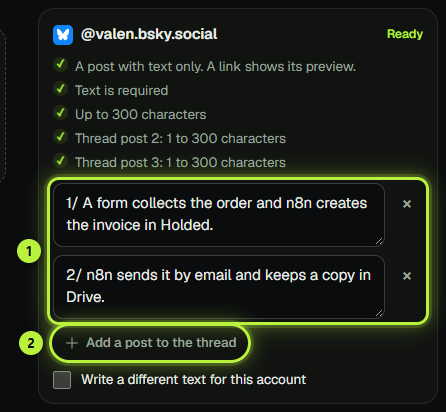
- The main text is the first post. Your photos or video go with the first post.
- You can add up to 24 more posts. Each one needs 1 to 300 characters.
- Linkpost publishes them in order, each as a reply to the one before.
Alt text
The alt text you write for each photo in the composer is sent to Bluesky, so screen readers can describe the photo.
Numbers from Bluesky
Linkpost does not read Bluesky numbers yet. Analytics shows what you published to Bluesky through Linkpost and whether it went out.
Disconnect Bluesky
On the Accounts page, open Manage on the account and choose Disconnect. Linkpost closes its session at Bluesky and deletes it. You can also delete the app password in Bluesky: Linkpost then loses access the next time it tries to post.
If something goes wrong
| Message | What it means | What to do |
|---|---|---|
| Enter your handle and an app password. | A field is empty. | Fill in both fields. |
| Use an app password, not your Bluesky password. | You entered your main password. | Create an app password and use it instead. |
| Bluesky did not accept that handle and app password. | The handle or the app password is wrong, or the app password was deleted. | Check the handle and create a new app password. |
| Bluesky says this account is not active. | The account is deactivated or suspended on Bluesky. | Fix the account on Bluesky first. |
| Bluesky could not be reached. Try again in a minute. | Bluesky did not answer. | Try again. |
| This Bluesky account is connected to another Linkpost user. | Someone else connected it. | Ask them to disconnect it. |
| Bluesky takes up to 300 characters (N now). | The text is too long. | Shorten it, or continue in a thread. |
| Post N of the thread needs 1 to 300 characters. | A post in the thread is empty or too long. | Fix that post or remove it. |
| Bluesky takes videos from 1 s to 3 min. | The video is longer than 3 minutes. | Trim it. |
| That file is too large for this network. | The video is larger than 100 MB. | Compress the video. |
| Bluesky could not process the video: reason | Bluesky failed while processing. Accounts without a verified email cannot post videos. | Verify your email on Bluesky, or export the video again. |
| Bluesky is taking too long to process the video. | Bluesky did not finish in time. | Check your profile before you send it again. |
| Bluesky access expired or was revoked. Connect the account again. | The session ended, for example because the app password was deleted. | Create a new app password and reconnect. |
| Bluesky rejected the post: reason | Bluesky refused the post and gave a reason. | Fix what the reason says. |
| Bluesky is temporarily unavailable. We will retry shortly. | Bluesky did not answer. Linkpost retried and gave up. | Use Retry later. |
For general help with failed posts, see Failed posts.