
MCP server
Let an AI assistant such as Claude list your accounts, publish and schedule posts and check how they went. The server's address, how it authenticates, the consent rule for publishing, and its limits.
The Model Context Protocol (MCP) is an open standard that lets AI assistants use tools from other services. Linkpost runs an MCP server, so an assistant you connect to it can work with your Linkpost accounts and posts while you chat with it.
The assistant goes through the same checks as the app and the REST API. It cannot publish anything the composer would refuse, and it cannot publish at all until you confirm the post.
What an assistant can do
The server gives the assistant these tools:
| Tool | What it does |
|---|---|
list_accounts |
Lists your connected accounts, their health and the formats each one takes. |
get_tiktok_creator_info |
Reads a TikTok account's current settings, live from TikTok. |
get_connect_link |
Gives the link you open in your browser to connect or reconnect an account. |
disconnect_account |
Disconnects an account, after you confirm. |
get_x_app, set_x_app, remove_x_app |
Read, save and remove the keys of your own X app, which X needs. Removing them needs your confirmation. |
list_posts |
Lists your posts with their status and time, by page or by a window of dates. |
get_post_status |
Reads one post, including why it failed if it did. |
get_post_stats |
Reads a post's numbers, one reading per day of its life. |
get_account_stats |
Reads an account's followers day by day and the numbers of its recent content. |
create_upload |
Gives one-time links where the assistant sends files from your computer. |
publish_post |
Publishes a post now, or schedules it. |
publish_posts |
Publishes or schedules one post on several accounts, all or none. |
reschedule_post |
Moves a scheduled post to another time. |
retry_post |
Sends a failed post again with the files Linkpost kept for it. |
cancel_post |
Cancels a scheduled post and deletes its file. |
remove_post |
Deletes a failed post and the files kept for it. |
get_settings, update_settings |
Read and change your timezone, language and email notifications. |
get_billing |
Reads what you pay and have used. |
send_feedback, list_feedback |
Send the Linkpost team an idea, a problem or a request for help in your own words, and list the ones you sent. |
list_reports, get_report_catalog, get_report |
List your analytics reports, what they can show, and one report with its numbers. |
create_report, update_report, delete_report |
Create, change and delete analytics reports. |
Accounts that pay per connected account get one more: update_billing_details. Accounts that have the WhatsApp inbox get twelve more, to read conversations, answer them, send and manage templates and disconnect a number. See WhatsApp.
Tools describes each one, with its arguments, examples and prompts to try. Things you can ask:
- "Which of my accounts need reconnecting?"
- "Schedule this video on my TikTok for Friday at 9:00: https://cdn.example.com/drop.mp4"
- "Post ~/Videos/scarf.mp4 as a reel on my Instagram now."
- "Did my LinkedIn post from this morning go out? If it failed, why?"
- "Move tomorrow's Instagram reel to Saturday at 18:00."
- "Cancel everything I scheduled on X for next week."
- "Post this video on my Instagram and my TikTok on Friday at 9:00."
- "Give me the link to connect my YouTube channel."
- "Retry the post that failed this morning."
- "Make a report with the reach and the top posts of my Instagram."
The assistant cannot accept a network's sign-in screen for you: to connect an account, it gives you a link to open in your browser. It cannot change your password, API keys or card, delete your Linkpost account or delete a post from a network. Do those in the app.
Address and authentication
| Setting | Value |
|---|---|
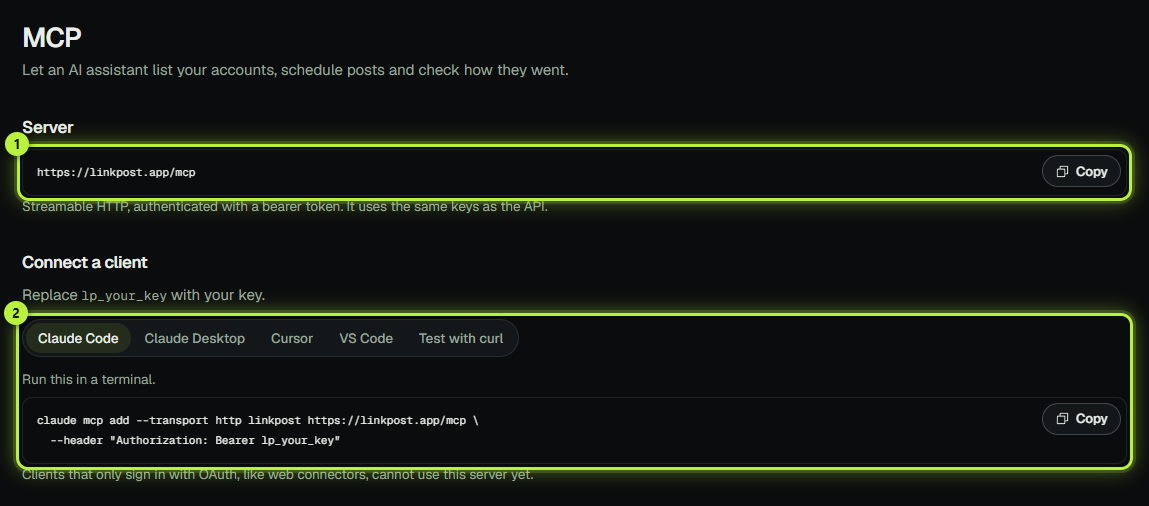
| URL | https://linkpost.app/mcp |
| Transport | Streamable HTTP. Clients often call it "HTTP". It is not SSE. |
| Authentication | Authorization: Bearer lp_your_key, with a Linkpost API key. |
The server uses the same API keys as the REST API. To create one, in the sidebar, under Developers, open API, then enter a Key name and your Current password and press Create key. See Authentication.
Create one key for each assistant and name it after the assistant, such as Claude Desktop. You can then stop one assistant without stopping the others.
Linkpost does not offer an OAuth sign-in for the MCP server. A client must be able to send the key in an Authorization header. Connect a client has the steps for Claude, Claude Code, Cursor and others.
In the sidebar, under Developers, MCP shows the server address, ready-made settings for some clients and the list of tools.
Nothing is published without your confirmation
Publishing is visible to other people, so Linkpost does not let an assistant publish on its own:
publish_postneedsconsent: true. Linkpost tells the assistant, when it connects and in the tool's description, to confirm the account, the content and the time with you first, and to setconsentonly after you agree.- Without consent, nothing happens. Linkpost answers
Ask the user to confirm this post, then call publish_post again with consent set to true.It does not even download the files. - The same goes for several accounts.
publish_postsneedsconsent: trueonce for all its posts, and Linkpost answersAsk the user to confirm these posts (the accounts, the content and the time), then call publish_posts again with consent set to true.without it. - Other tools ask first too.
disconnect_accountandremove_x_appneedconsent: trueafter you confirmed, because they cut accounts off. So do the WhatsApp tools that write to a person or disconnect a number. - Your client can ask too. Most clients ask you to approve each tool call, at least for tools that change something. Linkpost marks
publish_post,publish_postsandretry_postas tools that act outside the conversation, andcancel_post,remove_post,disconnect_account,remove_x_appanddelete_reportas ones that cannot be undone, so clients can treat them with care. Keep approval on for these tools. - TikTok gets extra care. Before a TikTok post, the assistant is told to read the creator info, tell you the creator's nickname, and let you choose who can see the post. There is no default. Interactions stay off unless you ask for them.
- TikTok consent covers TikTok's terms. For a TikTok post, your confirmation also accepts TikTok's Music Usage Confirmation, and its Branded Content Policy when the post is marked as branded content. The assistant is told to tell you this.
Before you confirm, check:
- The account: the network and the name.
- The text, word for word.
- The files: the right video or photos, in the right order.
- The time, and the timezone it is in. Without a time, the post goes out now.
- For TikTok: the visibility, the interactions and whether the post promotes a brand.
You are responsible for what goes out on your accounts, whoever writes it. Assistants make mistakes, so read the post before you approve it.
Where files come from
publish_post takes each file in one of two ways: a public link that Linkpost downloads, or a file the assistant sent from your computer through create_upload.
Videos can be MP4 or MOV, or WebM for TikTok. Stories can also be a JPEG photo. Photos can be JPEG, PNG or WebP, and documents PDF, PowerPoint or Word files. Text posts and polls need no files.
From a link
- The link must start with
https://, use the standard port and point to a public host name, not an IP address or a private network. - The link must return the file itself, without a sign-in. Share pages of cloud drives often return a web page instead of the file, which fails with
The URL did not return an MP4, MOV or WebM video or a JPEG image. - Each file can be up to 100 MB and must download within 60 seconds, after at most 3 redirects. For larger files, send them from your computer.
From your computer
An assistant that can run commands on your computer, such as Claude Code, can send a file there to Linkpost:
- It calls
create_uploadand gets a one-time link for each file. - It sends the file to the link, for example with
curl -F "file=@/path/to/video.mp4" "<upload_url>". - It calls
publish_postwith the upload's id inupload_id, orupload_idsfor several files, instead of a link.
Each file can be up to 512 MB. The link works for 60 minutes and takes one file. The file stays for 24 hours, so the same upload can go to several accounts, and each post keeps its own copy. Then Linkpost deletes it. Sending a file publishes nothing: publishing still needs publish_post and your confirmation.
An assistant that cannot run commands on your computer cannot send files this way. Give it a link instead.
Limits
| Limit | Value |
|---|---|
| Requests | 120 a minute per key, shared with REST requests made with the same key. |
| New posts | 10 a minute and 100 a day per user, counted apart from the REST API. retry_post counts too, and each account of publish_posts counts as one post. Past that, publish_post answers Too many posts for now. Wait a moment and try again. |
publish_posts |
Up to 25 accounts per call. |
| Files | Up to 100 MB each from a link and 512 MB from your computer, and up to 35 per post. |
| Uploads | Up to 50 at a time, and 5 GB in all, per user. Each one is deleted 24 hours after create_upload. |
list_posts |
Up to 50 posts per call, newest first. page gives the next ones. |
| Request size | 256 KB per request to the server. |
| Formats | The same as the API. Text, photo, carousel, document and poll posts are pending Meta and TikTok certification, and list_accounts shows the formats each account takes today. |
| Your account | The same limits as the app: scheduled posts, and monthly posts only on a plan with a monthly allowance. See Pricing and billing. |
Stop an assistant
To stop an assistant from using Linkpost, revoke its key: in the sidebar, under Developers, open API, press Revoke on the key's row and confirm with Revoke key. It stops working at once. Removing the server from the client is not enough if the key may have been copied elsewhere.
For client developers
These details matter if you build an MCP client or debug a connection.
- One endpoint. Every message is a
POSTtohttps://linkpost.app/mcpwith a JSON-RPC 2.0 body: one message, or a batch of up to 20. - Plain JSON answers. The server answers each request with
application/json. It opens no SSE stream, keeps no session and sends noMcp-Session-Id.GETandDELETEanswer405withAllow: POSTand{ "message": "This MCP server only accepts POST." }. - Protocol versions.
2025-11-25,2025-06-18,2025-03-26and2024-11-05.initializeanswers with the version the client asked for, or2025-11-25if it does not know it. A request with an unknownMCP-Protocol-Versionheader answers400. - Methods.
initialize,ping,tools/listandtools/call. Notifications get202with no body. The server offers tools only, no resources or prompts, and its tool list does not change during a session. - Tool results. A result has the data as JSON text in
contentand as an object instructuredContent. A failure the assistant can act on comes back as a result withisError: trueand the message incontent. - Protocol errors.
-32700for a body that is not JSON,-32600for an invalid message,-32601for an unknown method,-32602for an unknown tool or invalid arguments and-32603for a failure inside Linkpost, with a message that says so and the error reference indata.reference. - Authentication. A missing, wrong or revoked key answers
401withWWW-Authenticate: Bearer realm="linkpost". There is no OAuth metadata. - Origin. A request with an
Originheader other thanhttps://linkpost.appanswers403with{ "message": "Origin not allowed." }, so web pages on other sites cannot reach the server. - Size. A request over 256 KB answers
413.
An initialize request and its answer:
curl https://linkpost.app/mcp \
  -H "Authorization: Bearer $LINKPOST_KEY" \
  -H "Content-Type: application/json" \
  -H "Accept: application/json, text/event-stream" \
  -d '{"jsonrpc":"2.0","id":1,"method":"initialize","params":{"protocolVersion":"2025-06-18","capabilities":{},"clientInfo":{"name":"test","version":"1.0"}}}'
{
  "jsonrpc": "2.0",
  "id": 1,
  "result": {
    "protocolVersion": "2025-06-18",
    "capabilities": { "tools": { "listChanged": false } },
    "serverInfo": { "name": "linkpost", "title": "Linkpost", "version": "1.0.0" },
    "instructions": "Linkpost publishes and schedules posts on the TikTok, Instagram, Facebook, YouTube, LinkedIn, X, Bluesky and Telegram accounts the user connected. Start with list_accounts: each account lists the formats it takes (video, text, photos, carousel, document or poll) and their limits. To connect a network, or reconnect one, give the user the link from get_connect_link: its sign-in happens in their browser. Files can come from a public HTTPS link, or from the user's computer through create_upload. Before publish_post to a TikTok account, call get_tiktok_creator_info, tell the user the creator nickname and let them choose the visibility. Never set consent on your own: ask the user first, and only then set it to true."
  }
}