
TikTok
Connect a TikTok account, post videos to your profile or send them to your TikTok inbox, choose who can view them, disclose promotional content and fix the errors TikTok returns.
With TikTok you can post a video straight to your profile, or send it to your TikTok inbox as a draft and finish it in the TikTok app. Photo posts are pending Meta and TikTok certification.
TikTok has strict rules for apps that post on behalf of creators. Linkpost follows them: it reads your TikTok settings every time you write a post, it never chooses who can view a post for you, and nothing is sent until you confirm.
Before you connect
- You need a TikTok account that you can sign in to. Linkpost shows it as a Creator account.
- To post straight to your profile while Linkpost is in TikTok review, your TikTok account must be private, and those posts are only visible to you. With a public account, send the video to your inbox, which works with any account. See While Linkpost is in TikTok review.
Connect TikTok
- In the sidebar, open Accounts.
- Press Connect account and choose TikTok.
- A window opens on TikTok. Sign in with the account you want to connect.
- Review the permissions and keep them all on. Then confirm.
- The window closes. The message TikTok account connected. appears and the account is listed with the state Connected.
The permissions Linkpost asks for
| Permission | What it allows | If you turn it off |
|---|---|---|
user.info.basic |
Show your TikTok name and picture. | Linkpost cannot connect the account: We need permission to show which TikTok account is connected. |
video.upload |
Send videos to your TikTok inbox. | Send to inbox is not offered: Sending to the TikTok inbox is not available for this account. |
video.publish |
Post videos to your profile. | Post to profile is not offered: Direct posting is not available for this account. |
To get a permission back, reconnect the account and keep every permission on.
What you can publish
| Format | Files | Text | Limits |
|---|---|---|---|
| Video | One video: MP4, MOV or WebM | Caption up to 2,200 characters | Up to 512 MB. Up to the length TikTok allows your account. 360 to 4,096 pixels on each side, 23 to 60 frames per second, and encoded as H.264, HEVC, VP8 or VP9. |
| Photos | 1 to 35 photos: JPEG, PNG or WebP | Up to 4,000 characters | All 35 fit in one post from the composer. |
Video length. TikTok sets the longest video each account can post. Linkpost reads that limit from TikTok every time you open the form, and refuses a longer video before uploading it, with a message such as This video is 650 s. This TikTok account can post up to 10 min.
Video size, frame rate and codec. TikTok takes videos from 360 to 4,096 pixels on each side and from 23 to 60 frames per second, encoded as H.264, HEVC, VP8 or VP9. Linkpost checks all three before uploading, whether you post to your profile or send to your inbox, and refuses a video outside them with a message such as TikTok takes videos from 360 to 4096 pixels on each side, and this one is 320 × 568. Export it at a size in between, for example 1080 × 1920.
Photo posts. Linkpost turns every photo into a JPEG of up to 2,560 pixels on the long side. The first line of your text, up to 90 characters, becomes the post's title on TikTok. The whole text, up to 4,000 characters, is its description. TikTok adds music to photo posts automatically.
Post to your profile or send to your inbox
When you write a TikTok post, choose how it goes out:
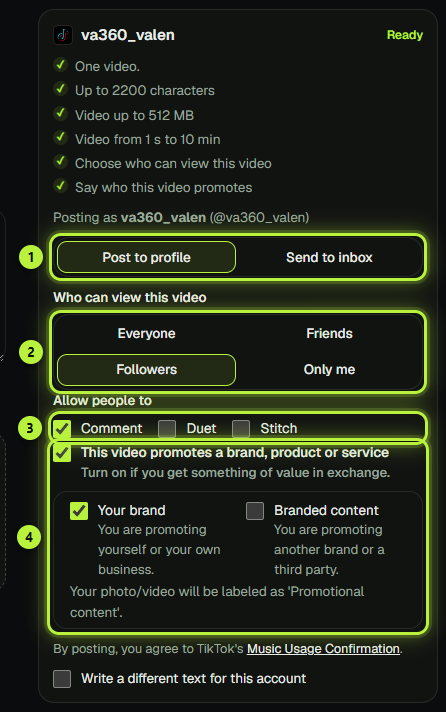
- Post to my profile (in the composer: Post to profile). The post goes live on your profile with the caption, visibility and interactions you choose in Linkpost.
- Send to TikTok inbox (in the composer: Send to inbox). The video arrives in your TikTok inbox as a draft. Open the TikTok app to add a caption, choose the settings and post it. Linkpost does not send the caption in this mode.
A post sent to the inbox ends with the status Waiting in your TikTok inbox. Linkpost cannot see whether you posted it afterwards.
Choose who can view the post
For a post to your profile, choose one option under Who can view this video. TikTok requires the creator to choose every time, so no option is selected for you. Linkpost shows only the options your TikTok account allows:
| Option | Who can view the post |
|---|---|
| Everyone | Anyone on TikTok. |
| Friends | Followers you follow back. |
| Followers | Your followers. |
| Only me | Only you. |
While Linkpost is in TikTok review
TikTok limits apps that it has not approved yet. Until TikTok approves Linkpost, it only takes posts to the profile of private TikTok accounts, and those posts are only visible to you. Linkpost checks whether your account is private every time you open the form, when you publish and just before a scheduled post goes out. It knows your account is public because TikTok offers Everyone only to public accounts.
- Public account. Send to inbox comes selected, and the form shows Until TikTok approves Linkpost, it only takes posts to the profile of private accounts, and this account is public. Send the video to your TikTok inbox and post it from the TikTok app, or set the account to private first. If you choose Post to profile anyway, Linkpost refuses the post with the same message before sending anything.
- Private account. The form shows Until TikTok approves Linkpost, posts to your profile are only visible to you, and they stay private afterwards. To post for everyone, send the video to your inbox and post it from the TikTok app.
- Send to inbox works with public and private accounts.
- Videos you post to your profile during the review stay private after TikTok approves Linkpost. To show one to more people, change who can see it in the TikTok app.
To post to your profile during the review, set your TikTok account to private in the TikTok app. TikTok may ask you to turn off ad authorization first. If you want your account to stay public, use Send to inbox instead.
Posts published as Only me stay private on TikTok. You can change who can view each one later in the TikTok app.
Comments, Duet and Stitch
Under Allow people to, choose what people can do with the post: Comment, Duet and Stitch. All three start turned off, so people can do nothing until you tick them.
If you turned an interaction off in your TikTok settings, Linkpost shows it greyed out with Turned off in your TikTok settings. and you cannot turn it on here.
Photo posts only offer Comment.
Disclose promotional content
If the post promotes a brand, a product or a service in exchange for something of value, turn on This video promotes a brand, product or service. Then tick at least one:
- Your brand: you promote yourself or your own business. TikTok labels the post Promotional content.
- Branded content: you promote another brand or a third party. TikTok labels the post Paid partnership.
You cannot publish until you tick one of them. Branded content cannot be private, so Only me is not available when Branded content is ticked, and the other way round.
Under the form, Linkpost reminds you that by posting you agree to TikTok's Music Usage Confirmation, and also to its Branded Content Policy when you tick Branded content.
Scheduled TikTok posts
You can schedule TikTok posts like any other. Your TikTok settings can change while a post waits, so Linkpost checks them again just before sending. The post fails, and nothing is sent, if:
- The visibility you chose is no longer available for your account.
- You turned off an interaction that the post allows, in your TikTok settings.
- The longest video your account can post is now shorter than the video.
- The post goes to your profile, Linkpost is still in TikTok review and your account is now public.
TikTok allows only a few requests per account each minute. When several posts for the same TikTok account are due at the same time, Linkpost sends them 30 seconds apart.
After you post
TikTok processes each video before it appears. The post's page shows Uploading to TikTok, then TikTok is processing the video (TikTok is processing the photos for a photo post), then Published or Waiting in your TikTok inbox. It may take a few minutes for the post to be visible on your profile.
Linkpost does not read TikTok followers or video numbers yet: TikTok has not opened them to Linkpost. See Analytics.
Disconnect TikTok
On the Accounts page, open Manage on the account and choose Disconnect. Linkpost cancels its access at TikTok and deletes its tokens.
You can also remove Linkpost inside TikTok: in TikTok, go to Settings and privacy, then Security and permissions, then Apps and services (or Manage app permissions), select Linkpost and remove its access. TikTok tells Linkpost, and Linkpost removes the account and fails its pending posts.
If something goes wrong
| Message | What it means | What to do |
|---|---|---|
| TikTok access expired or was revoked. Connect the account again. | TikTok no longer accepts Linkpost's access. | Reconnect the account from Accounts. |
| Until TikTok approves Linkpost, it only takes posts to the profile of private accounts, and this account is public. Send the video to your TikTok inbox and post it from the TikTok app, or set the account to private first. | Your account is public and TikTok has not approved Linkpost yet. Nothing was sent. | Use Send to inbox, or set the account to private in the TikTok app and try again. |
| This app is still in review, so TikTok only accepts posts from private accounts. Set your TikTok account to private and try again, or send the video to your inbox. | TikTok refused a post to the profile of a public account. Linkpost checks this before sending, so you only see it if TikTok refuses the post anyway. | Make the account private, or use Send to inbox. |
| Choose who can view this video. | No visibility was chosen. | Choose an option under Who can view this video. |
| That visibility is not available for this TikTok account. | The option you chose is not one your account allows. | Choose another option. |
| That visibility is no longer available for this TikTok account. Reload and choose again. | Your TikTok settings changed while the form was open. | Reload the page and choose again. |
| Comment, Duet or Stitch is turned off in this creator's TikTok settings. | You allowed an interaction that is off in TikTok. | Untick it, or turn it on in TikTok first. |
| You need to indicate if your content promotes yourself, a third party, or both. | The disclosure is on but nothing is ticked. | Tick Your brand, Branded content or both. |
| Branded content visibility cannot be set to private. | Branded content is ticked with Only me. | Choose another visibility. |
| This video is N. This TikTok account can post up to M. | The video is too long for your account. Lengths are written exactly, such as 650 s or 10 min. | Shorten the video. |
| The video is longer than this account is allowed to post. | TikTok refused the length. | Shorten the video. |
| TikTok takes videos from 360 to 4096 pixels on each side, and this one is W × H. Export it at a size in between, for example 1080 × 1920. | The video is too small or too large for TikTok. | Export it again at a size in between, such as 1080 × 1920. |
| TikTok takes videos from 23 to 60 frames per second, and this one has N. Export it at 30 frames per second. | The video has fewer or more frames per second than TikTok takes. | Export it again at 30 frames per second. |
| TikTok takes videos encoded as H.264, HEVC (H.265), VP8 or VP9, and this one is codec. Export it as an MP4 with H.264. | The video uses a codec TikTok does not take, such as ProRes. | Export it again as MP4 with the H.264 codec. |
| Upload an MP4, MOV or WebM video. | The file is not a supported video. | Export the video as MP4. |
| TikTok rejected the video format. Use MP4, MOV or WebM with H.264. | TikTok could not read the video. | Export it again as MP4 with the H.264 codec. |
| TikTok could not process the video (reason). | TikTok failed while processing, for a reason that has no message of its own in this table. | Check the reason, fix the file and send it again. |
| TikTok takes videos from 360 to 4096 pixels on each side, and photos up to 1080p. Export it at a size in between, for example 1080 × 1920, and try again. | TikTok refused the size of the video or the photos after the upload. | Export it again at a size in between and send it again. |
| TikTok takes videos from 23 to 60 frames per second. Export it at 30 frames per second and try again. | TikTok refused the video's frame rate after the upload. | Export it again at 30 frames per second and send it again. |
| TikTok could not download the file from Linkpost. Try again. | TikTok did not manage to download the video or the photos. | Use Retry. |
| This TikTok account reached the posts TikTok allows from apps in a day. Try again tomorrow, or post it from the TikTok app. | TikTok limits how many posts an account makes each day from apps like Linkpost. | Try again tomorrow, or post it from the TikTok app. |
| TikTok took the description for spam. Change the text and try again. | TikTok took the post's text for spam. | Change the text and send the post again. |
| TikTok took this post for spam and did not publish it. | TikTok took the post for spam. | Review the video and the text before you send it again. |
| TikTok has blocked this account from posting. | TikTok does not let this account post. | Check the account's status in the TikTok app. |
| TikTok had a problem of its own processing the video. Try again. | TikTok failed for a reason of its own, not because of the file. | Use Retry. |
| TikTok is taking too long to process the video. Check your TikTok app. | TikTok did not finish in time. | Check your profile or inbox in TikTok before you send it again. |
| This TikTok account cannot post right now. Please try again later. | TikTok is limiting the account, for example after many posts. | Wait and try later. |
| TikTok limits how often this account can be queried. Wait a minute and try again. | Too many requests in a short time. | Wait a minute. |
| TikTok is temporarily unavailable. We will retry shortly. | TikTok did not answer. Linkpost retried and gave up. | Use Retry later. |
| TikTok is temporarily unavailable. Try again in a minute. | TikTok did not answer while Linkpost read your account's settings, when you opened the form or published. Nothing retries this on its own. | Wait a minute and try again. |
| That TikTok account is already connected to another user. | Another Linkpost user connected this TikTok account. | Ask them to disconnect it. |
| The visibility chosen for this post is no longer available for this TikTok account. Nothing was sent. | A scheduled post's visibility changed in TikTok. | Write the post again with a new visibility. |
| Interaction was turned off in this creator's TikTok settings after the post was scheduled. Nothing was sent. | An interaction the post allowed is now off in TikTok. | Write the post again without it. |
For general help with failed posts, see Failed posts.