
Connect an Instagram professional account and publish Reels, stories, feed photos and carousels, with the limits Instagram sets and the fixes for its errors.
With Instagram you can publish Reels and stories. Feed photos and carousels are pending Meta and TikTok certification.
Before you connect
- You need a professional account. Instagram only lets apps publish to professional accounts: Business or Creator. A personal account cannot be connected. You can switch a personal account to a professional account in the Instagram app settings.
- You do not need a Facebook Page. You sign in with Instagram directly. You do not need a Facebook account or a business portfolio either.
Connect Instagram
- In the sidebar, open Accounts.
- Press Connect account and choose Instagram.
- A window opens on Instagram. Sign in with the professional account you want to connect.
- Allow Linkpost to read your profile and to publish content. Keep both options on.
- The window closes. The message Instagram account connected. appears and the account is listed as a Professional account.
Linkpost asks Instagram for two permissions:
| Permission | What it allows |
|---|---|
instagram_business_basic |
Read your profile, your recent posts and their counts. |
instagram_business_content_publish |
Publish to your account. |
If you turn off publishing, Linkpost cannot use the account and shows We need permission to publish to your Instagram account. Connect it again and keep that option on.
Instagram gives access for 60 days. Linkpost renews it automatically every day, so you do not need to reconnect while the access keeps working.
What you can publish
| Format | Files | Caption | Limits |
|---|---|---|---|
| Reel | One video: MP4 or MOV | Up to 2,200 characters | 3 seconds to 15 minutes. Up to 300 MB. Up to 1,920 pixels wide and 23 to 60 frames per second. |
| Story | One video (MP4 or MOV) or one JPEG photo | No caption | Videos from 3 to 60 seconds, up to 100 MB, up to 1,920 pixels wide and 23 to 60 frames per second. Visible for 24 hours. |
| Post | One photo: JPEG, PNG or WebP | Up to 2,200 characters | Between 4:5 (portrait) and 1.91:1 (landscape). |
| Carousel | 2 to 10 photos or videos, mixed as you like | Up to 2,200 characters | Photos between 4:5 and 1.91:1. Videos MP4 or MOV, 3 to 60 seconds each, with the size and frame rate of a Reel. |
Video size, shape and frame rate. Instagram's API takes Reel, story and carousel videos up to 1,920 pixels wide and from 23 to 60 frames per second, encoded as H.264 or HEVC. Their shape, width to height, goes from 1:100 to 10:1 for Reels and carousel videos, and from 1:10 to 10:1 for stories, and a story video can be up to 100 MB. Linkpost checks all of this before uploading, and refuses a video outside it with a message such as Instagram takes videos up to 1920 pixels wide, and this one is 2160 × 3840. Export it smaller, for example at 1080 × 1920.
Choose Reel or Story
A single video can be a Reel or a story.
- In the one-account form, choose under What do you want to publish?: Reel (a video on your profile, with a caption) or Story (a video or JPEG photo for 24 hours, without a caption).
- In the multi-account composer, choose under Post as in the Instagram requirements. The option appears when your files fit more than one format.
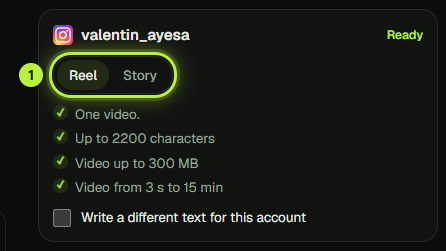
Stories have no caption. If you wrote text, Linkpost leaves it out of the story and tells you so in the requirements: No caption on a story: the text is left out.
A story photo must be a JPEG file. The multi-account composer turns PNG and WebP photos into JPEG first, so you can use any photo there. Videos for stories must last between 3 and 60 seconds.
Photos and carousels
Instagram only accepts photos between 4:5 (portrait) and 1.91:1 (landscape). A square photo is fine. A photo that is taller than 4:5, such as a full-screen phone screenshot, is refused. Crop it before you add it.
Linkpost turns every photo into a JPEG of up to 2,560 pixels on the long side, turns it the right way up and removes the camera's metadata. You can add photos as JPEG, PNG or WebP.
In a carousel, the files appear in the order you set in the composer. Use the arrows on each file to change the order. See The composer.
Instagram does not receive the alt text you write for photos.
Collaborators and tagged people
You can invite other Instagram accounts to a post as collaborators, and tag people in it.
| Reel | Story | Post | Carousel | |
|---|---|---|---|---|
| Collaborators, up to 3 | Yes | No | Yes | Yes |
| Tagged people, up to 20 | Yes | Yes | Yes | No |
- Collaborators get an invite in Instagram. Once one accepts, the post also shows on their profile.
- Tagged people are tagged in the post. On a photo, Instagram needs a spot for each tag, so Linkpost puts it in the centre.
- Write the usernames separated by commas, with or without the
@, such as@ana.gomez, @studio_x. Capital letters and repeated names do not matter. - The account you post from cannot be a collaborator or be tagged.
In the multi-account composer, Collaborators and Tag people appear in the Instagram requirements once your files fit a format that takes them. In the one-account form, they appear under the caption, and Collaborators hides when you choose Story. The post's page lists them.
Instagram checks each username when the post goes out. If it refuses one, for example because no account has that username, the post fails with Instagram's own words. Fix the username and send the post again with Edit post, which keeps the names.
After you post
Instagram processes each file before it is published. The post's page shows Uploading to Instagram, then Instagram is processing the video, then Published. It may take a few minutes.
Instagram limits how many posts an account can publish in one day. When the limit is reached, posts fail with This Instagram account reached its daily publishing limit. Try again tomorrow.
Numbers from Instagram
Linkpost reads your followers once a day and the likes and comments of your recent posts. Shares, saves and views appear when Instagram returns them. Reach needs a permission that Meta has not granted to Linkpost yet. See Analytics.
Disconnect Instagram
On the Accounts page, open Manage on the account and choose Disconnect. Linkpost deletes its access tokens at once.
Instagram does not let Linkpost cancel the access from its side. To remove Linkpost from Instagram too, open Instagram Settings, then Website permissions or Apps and websites, select Linkpost and remove it. Instagram tells Linkpost, and Linkpost removes the account and fails its pending posts.
If something goes wrong
| Message | What it means | What to do |
|---|---|---|
| Meta access expired or was revoked. Connect the account again. | Instagram no longer accepts Linkpost's access. | Reconnect the account. |
| This account did not grant the permission needed to publish. Connect it again and accept all permissions. | A permission is missing. | Reconnect and keep every option on. |
| This Instagram account reached its daily publishing limit. Try again tomorrow. | Instagram's daily limit. | Send it again the next day. |
| The video must last between 3 and 900 seconds. | The Reel is shorter than 3 seconds or longer than 15 minutes. | Trim or extend the video. |
| The video must last between 3 and 60 seconds. | The story video is too short or too long. | Trim the video, or publish it as a Reel. |
| Upload an MP4 or MOV video. | The file is not a supported video. | Export the video as MP4. |
| Upload an MP4, MOV or JPEG file. | A story file is not MP4, MOV or JPEG. In the one-account form or the API, a PNG or WebP photo cannot be a story; the multi-account composer converts it first. | Save the photo as JPEG. |
| Instagram takes carousel videos from 3 s to 60 s. | A video in the carousel is shorter than 3 seconds or longer than 60. | Trim the video, or publish it as a Reel. |
| Instagram takes MP4 or MOV videos. | A WebM video went to Instagram in the multi-account composer. | Export the video as MP4. |
| Instagram takes videos up to 1920 pixels wide, and this one is W × H. Export it smaller, for example at 1080 × 1920. | The video is wider than Instagram takes. | Export it again at 1080 × 1920. |
| Instagram takes videos from 1:100 to 10:1 in shape (width to height), and this one is W × H. Crop it to a shape in between, such as 9:16. | The Reel or carousel video is too narrow or too wide. For a story it says from 1:10 to 10:1. | Crop it to a shape such as 9:16 and export it again. |
| Instagram takes videos from 23 to 60 frames per second, and this one has N. Export it at 30 frames per second. | The video has fewer or more frames per second than Instagram takes. | Export it again at 30 frames per second. |
| Instagram takes videos encoded as H.264 or HEVC (H.265), and this one is codec. Export it as an MP4 with H.264. | The video uses a codec Instagram does not take, such as ProRes. | Export it again as MP4 with the H.264 codec. |
| Instagram takes videos of up to 100 MB, and this file has N MB. | The story video is larger than 100 MB. | Compress the video, or publish it as a Reel. |
| That format is not available for this account. | The format chosen is not available here. | Choose Reel or Story. |
| Instagram could not use the photo. It needs to be between 4:5 and 1.91:1. | The photo is too tall or too wide. | Crop it and send the post again. |
| Instagram could not process one of the carousel items. Photos need to be between 4:5 and 1.91:1, videos MP4 or MOV. | One file in the carousel was refused. | Fix that file and send the carousel again. |
| Instagram could not create the carousel. | Instagram refused the carousel as a whole. | Check the files and send it again. |
| Instagram could not process the video. Check that it is a valid MP4 or MOV. | Instagram could not read the video. | Export it again as MP4 and send it again. |
| Instagram discarded the video before it was published. Please try again. | Instagram dropped the upload. | Use Retry. |
| Instagram is taking too long to process the video. | Instagram did not finish in time. | Check your profile before you send it again. |
| Meta is temporarily unavailable. We will retry shortly. | Instagram did not answer. Linkpost retried and gave up. | Use Retry later. |
| Instagram takes up to 3 collaborators. | More than 3 collaborators. | Keep 3 at most. |
| Instagram takes up to 20 tagged people. | More than 20 tagged people. | Keep 20 at most. |
| Instagram stories take no collaborators. Tag those people instead (tagged_users). | A story had collaborators. | Tag them in Tag people, or publish a Reel. |
| Instagram carousels take no tagged people. | A carousel had tagged people. | Remove them, or invite them as collaborators. |
| name is not an Instagram username. Usernames have up to 30 letters, numbers, periods and underscores. | A username has other characters or is too long. | Check how it is spelled. |
| @name is the account you are posting from: it cannot be a collaborator or be tagged. | The account itself is in the list. | Remove it. |
| Instagram rejected the post: "Instagram's words". If it is about a collaborator or a tagged person, check that the username exists and the account is public. | Instagram refused a post that has collaborators or tagged people. | Read Instagram's words, fix the username and send the post again. |
| Meta rejected the request (code). | Instagram refused for another reason. | Check the file and the caption, then try again. |
| This Instagram account is connected to another Linkpost user. | Someone else connected it. | Ask them to disconnect it. |
For general help with failed posts, see Failed posts.