
Telegram
Connect a Telegram channel by adding the Linkpost bot as an admin, then publish videos, text, photos, documents and polls, with Telegram's limits and the fixes for its errors.
With Telegram you can publish videos to the channels you run. Text posts, photo posts, documents and polls are pending Meta and TikTok certification.
Linkpost posts to Telegram through its own bot. You add the bot to your channel as an admin who can post messages, and Linkpost publishes as the channel.
Before you connect
- Linkpost publishes to channels only. It cannot publish to groups or to private chats.
- You need to be an admin of the channel, with the right to add admins.
- You need the Telegram app on the same device, or Telegram Web open in your browser.
Connect a channel
- In the sidebar, open Accounts.
- Press Connect account and choose Telegram. The window Connect a Telegram channel opens with two steps. It names the Linkpost bot.
- Press Open Telegram. The bot opens in Telegram. Press Start. This tells the bot that the channel you add next is yours. The bot answers with a button to add it to a channel.
- Back in Linkpost, press Add to a channel, or use the button in the bot's message.
- In Telegram, pick the channel. Keep Post messages on and save.
- The bot confirms in Telegram with Done. Linkpost can now post to channel. Linkpost notices by itself and shows Telegram channel channel connected. The channel appears on the Accounts page as a Channel.
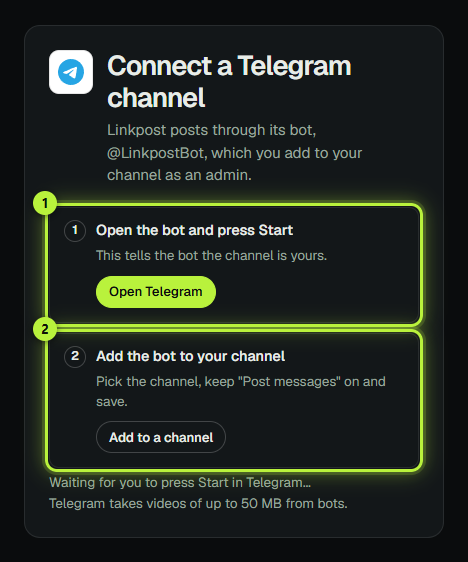
The connection link works for 30 minutes. If it expires, start again from Accounts.
To connect another channel, repeat the steps and pick the other channel.
What you can publish
| Format | Files | Text | Limits |
|---|---|---|---|
| Video | One video: MP4 or MOV | Caption up to 1,024 characters | Up to 50 MB. |
| Text | No files | 1 to 4,096 characters | |
| Photos | 1 to 10 photos: JPEG, PNG or WebP | Caption up to 1,024 characters | Sent as one album. |
| Document | One PDF, PowerPoint (PPT, PPTX) or Word (DOC, DOCX) file | Caption up to 1,024 characters | Up to 50 MB. |
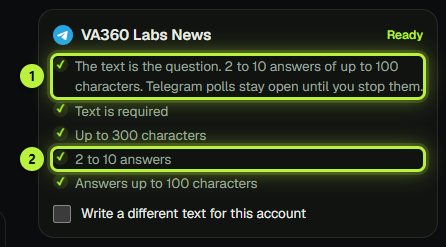
| Poll | No files | The question, up to 300 characters | 2 to 10 answers of up to 100 characters. |
Files up to 50 MB. Telegram only takes files of up to 50 MB from bots. This applies to videos and documents, and Linkpost checks it before it sends anything: a larger document is refused with Telegram takes files of up to 50 MB. Compress larger files before you add them.
Captions. A post with files takes a caption of up to 1,024 characters. A text post without files takes up to 4,096. In an album of several photos, the caption goes with the first photo.
The post appears at once. Telegram does not process files the way other networks do. As soon as Telegram has the file, the post is in the channel.
Polls
The text of the post is the question, up to 300 characters. Add 2 to 10 answers of up to 100 characters.
Polls in channels are anonymous. Telegram polls also have no end time: they stay open until you stop them in Telegram. The Open for setting in the composer does not apply to Telegram, and it is hidden when the poll only goes to Telegram. Through the API or the MCP server, a Telegram poll needs no poll_hours.
Numbers from Telegram
Linkpost does not read Telegram numbers yet. Analytics shows what you published to Telegram through Linkpost and whether it went out.
When the bot loses access
If someone removes the bot from the channel, or takes away its right to post messages, Linkpost marks the channel Reconnect needed. Posts to it fail with The Linkpost bot can no longer post in this channel. Add it again as an admin, then reconnect.
To fix it, add the bot to the channel again as an admin with Post messages on. The bot confirms with Linkpost can post to channel again., and the channel works again in Linkpost.
Disconnect a channel
On the Accounts page, open Manage on the channel and choose Disconnect. The bot leaves the channel and Linkpost deletes the connection.
If something goes wrong
| Message | What it means | What to do |
|---|---|---|
| Telegram takes files of up to 50 MB. | The document is larger than 50 MB. Linkpost refuses it before sending. | Compress the file. |
| Telegram takes files of up to 50 MB from bots. | The video or document is larger than 50 MB. | Compress the file. |
| That file is too large for this network. | The video is larger than 50 MB. | Compress the video. |
| Upload an MP4 or MOV video. | The file is not a supported video. | Export it as MP4. |
| Documents can be PDF, PowerPoint or Word files. | The document type is not supported. | Save it as PDF. |
| Telegram takes up to 1024 characters (N now). | The caption of a post with files is too long. | Shorten it, or publish the text on its own. |
| Telegram takes up to 4096 characters (N now). | The text post is too long. | Shorten it. |
| Telegram polls need 2 to 10 answers. | The poll has too few or too many answers. | Add or remove answers. |
| Telegram poll answers take up to 100 characters. | An answer is too long. | Shorten it. |
| The Linkpost bot can no longer post in this channel. Add it again as an admin, then reconnect. | The bot was removed or lost the right to post. | Add the bot again as an admin who can post messages. |
| Channel is already connected to another Linkpost user. | Another Linkpost user connected this channel. | Ask them to disconnect it. |
| To connect this channel to Linkpost, open Accounts in Linkpost and choose Connect Telegram first. | You added the bot to a channel without starting from Linkpost, or the link expired. | Start again from Accounts in Linkpost. |
| The channel was not connected. Start again and add the bot as an admin. | The steps were not finished in time, or the bot was added without the right to post. | Start again and keep Post messages on. |
| Telegram could not be reached. Try again in a minute. | Linkpost could not reach Telegram to start the connection. | Wait a minute and try again. |
| Telegram rejected the post: reason | Telegram refused the post and gave a reason. | Fix what the reason says. |
| Telegram is temporarily unavailable. We will retry shortly. | Telegram did not answer. Linkpost retried and gave up. | Use Retry later. |
For general help with failed posts, see Failed posts.