
API overview
Publish, schedule and track posts on every network you connected, from your own code. The base URL, how requests and responses look, and a five-minute quickstart in cURL, JavaScript, Python and PHP.
The Linkpost REST API does from code what the composer does in the app. It publishes and schedules posts on the TikTok, Instagram, Facebook, YouTube, LinkedIn, X, Bluesky and Telegram accounts you connected, and it tells you how each post went.
The API checks a post with the same rules as the app. A post that the composer would refuse is refused by the API too, with a message that says why, and nothing is stored.
What you can do
| Method | Path | What it does |
|---|---|---|
GET |
/api/v1/accounts |
Lists your connected accounts and what each one can publish. See Accounts. |
GET |
/api/v1/accounts/{id}/creator-info |
Reads a TikTok account's current settings, live from TikTok. See Accounts. |
GET |
/api/v1/accounts/{id}/stats |
Reads an account's follower history and the numbers of its recent content. See Numbers and links. |
GET |
/api/v1/connect-links |
Gives the link that connects or reconnects an account in a browser. See Connect or reconnect an account. |
DELETE |
/api/v1/accounts/{id} |
Disconnects an account. See Disconnect an account. |
GET, PUT, DELETE |
/api/v1/x-app |
Reads, saves and removes the keys of your own X app, which X needs. See Your X app. |
POST |
/api/v1/posts |
Publishes a post now or schedules it. See Posts. |
POST |
/api/v1/posts/batch |
Publishes or schedules one post on several accounts, all or none. See Publish on several accounts at once. |
GET |
/api/v1/posts |
Lists your posts, newest first, with filters and a calendar window. |
GET |
/api/v1/posts/{id} |
Reads one post and its status. |
GET |
/api/v1/posts/{id}/stats |
Reads a post's link, its numbers and one reading per day of its life. See Numbers and links. |
POST |
/api/v1/posts/{id}/reschedule |
Moves a scheduled post to another time. |
POST |
/api/v1/posts/{id}/retry |
Sends a failed post again with the files Linkpost kept for it. See Retry a failed post. |
POST |
/api/v1/posts/{id}/remove |
Deletes a failed post and the files kept for it. See Remove a failed post. |
DELETE |
/api/v1/posts/{id} |
Cancels a scheduled post. |
POST |
/api/v1/uploads |
Gives a link to send a file from your computer, to use by its id in a post or a WhatsApp message. See Files by link or from your computer. |
GET, PATCH |
/api/v1/me |
Reads and changes your timezone, language and email notifications. See Settings and billing. |
GET |
/api/v1/billing |
Reads what you pay and have used. See Settings and billing. |
/api/v1/members…, /api/v1/clients… |
Agency mode: invites people to manage your account and lists the accounts you manage. The Linkpost-Account header works on one of them. See Team and clients. |
|
POST, GET |
/api/v1/feedback |
Sends the Linkpost team an idea, a problem or a request for help, and lists the ones you sent. See Feedback and support. |
/api/v1/reports… |
Lists, reads, creates, changes and deletes the reports of the Analytics page, with their numbers. See Reports. | |
/api/v1/whatsapp/… |
The WhatsApp inbox: numbers, conversations, messages, templates and files, for accounts that have it. See WhatsApp. |
The API cannot edit a post that already went out or delete a post from a network. Connecting an account needs the network's own sign-in screen in a browser, so the API gives you the link to open. API keys, your password, two-step sign-in and your card stay in the app.
Before you start
- You need a Linkpost account. Sign up on the website, or use an invitation from the Linkpost team. See Getting started.
- Connect at least one account in the app. The API publishes only to accounts that are already connected. See Connect your accounts.
- Create an API key. The quickstart below shows how. The same key also works for the MCP server.
Base URL and requests
Every endpoint lives under this base URL:
https://linkpost.app/api/v1
Send your key on every request in the Authorization header, as a bearer token. See Authentication.
Authorization: Bearer lp_your_key
How to send the body of a request:
- Posts with files (videos, stories, photos, carousels, documents) go as
multipart/form-data. Send each field as a form field and each file as a file part. - Posts without files (text posts and polls) and reschedule requests can go as JSON with
Content-Type: application/json, or as a form. Both work. - Lists in a form use the field name with
[], repeated once per item:files[],alt[],poll_options[],thread[]. In JSON, send a normal array without the brackets. - Yes or no fields in a form take
1for yes and0for no. In JSON you can also usetrueandfalse.
What comes back:
- Every response is JSON, errors included. You do not need to send an
Acceptheader. - A single item comes inside
data. A list comes insidedatatoo, withlinksandmetafor pagination. - Dates are ISO 8601 in UTC, like
2026-11-20T08:30:00Z. - Account ids are numbers, like
12. Post ids are strings of 26 letters and digits, like01m6xag75ghras1sek74sdmft8. - Errors have a
message, and validation errors also list each field inerrors. See Errors. - Labels and messages are in English. The exception is
fail_reason, and thestatus_detailof a failed post, which repeats it: they are in the account owner's language, the one chosen in the app's settings. See Post statuses.
Quickstart
In five minutes you create a key, find your accounts, schedule a post and check its status. The example schedules an Instagram reel for later, so nothing goes public while you try it, and you cancel it at the end. For other networks, Posts shows the fields each one needs.
1. Create a key
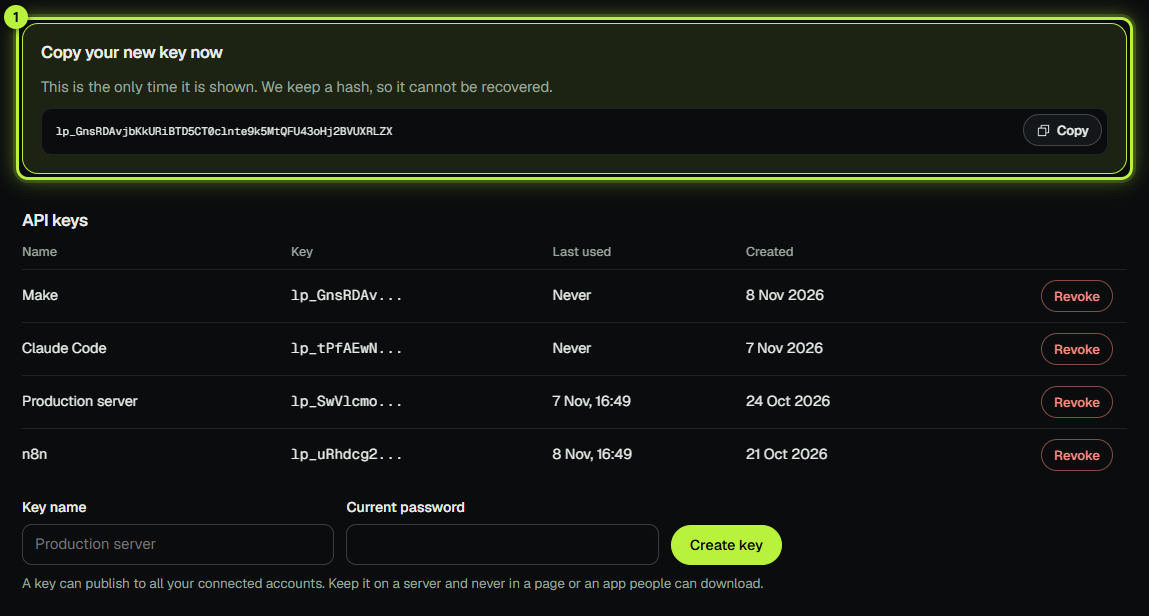
- In the sidebar, under Developers, open API.
- Under API keys, enter a Key name that says where you will use the key, such as
Laptop test. - Enter your Current password and press Create key.
- Copy the key from Copy your new key now. It starts with
lp_. This is the only time Linkpost shows it.
2. Keep the key in an environment variable
Keep the key out of your code. On macOS and Linux:
export LINKPOST_KEY=lp_your_key
In Windows PowerShell:
$env:LINKPOST_KEY = "lp_your_key"
The cURL examples on these pages use Bash syntax. On Windows, run them in Git Bash or WSL, or replace $LINKPOST_KEY with $env:LINKPOST_KEY and the \ line breaks with backticks in PowerShell.
3. List your accounts
Find the id of the account you want to publish to.
curl https://linkpost.app/api/v1/accounts \
  -H "Authorization: Bearer $LINKPOST_KEY"
const response = await fetch("https://linkpost.app/api/v1/accounts", {
  headers: { Authorization: `Bearer ${process.env.LINKPOST_KEY}` },
});
const { data } = await response.json();

for (const account of data) {
  console.log(account.id, account.platform, account.name, account.health);
}
import os

import requests

response = requests.get(
    "https://linkpost.app/api/v1/accounts",
    headers={"Authorization": f"Bearer {os.environ['LINKPOST_KEY']}"},
    timeout=30,
)

for account in response.json()["data"]:
    print(account["id"], account["platform"], account["name"], account["health"])
<?php
require 'vendor/autoload.php';

$client = new GuzzleHttp\Client([
    'base_uri' => 'https://linkpost.app/api/v1/',
    'headers' => ['Authorization' => 'Bearer '.getenv('LINKPOST_KEY')],
    'http_errors' => false,
]);

$accounts = json_decode((string) $client->get('accounts')->getBody(), true)['data'];

foreach ($accounts as $account) {
    echo $account['id'], ' ', $account['platform'], ' ', $account['name'], ' ', $account['health'], PHP_EOL;
}
Part of the response, for one Instagram account:
{
  "data": [
    {
      "id": 12,
      "platform": "instagram",
      "name": "maracosta",
      "avatar_url": "https://scontent.cdninstagram.com/v/t51/maracosta.jpg",
      "health": "ok",
      "health_label": "Connected",
      "post_options": { "format": ["reel", "story"] },
      "formats": [
        { "format": "reel", "label": "Reel", "takes": ["video"], "min_files": 1, "max_files": 1, "max_text": 2200, "hint": "One video." },
        { "format": "story", "label": "Story", "takes": ["video", "image"], "min_files": 1, "max_files": 1, "max_text": 0, "hint": "One photo or video for 24 hours, no caption." }
      ],
      "connected_at": "2026-10-02T10:15:00Z"
    }
  ]
}
health must be ok or expiring to publish. Accounts explains every field.
4. Schedule a post
Send a video to the account. Use a short MP4 or MOV file of at least 3 seconds, and change scheduled_at to a time later today. Leave out scheduled_at to publish right away.
curl https://linkpost.app/api/v1/posts \
  -H "Authorization: Bearer $LINKPOST_KEY" \
  -F account_id=12 \
  -F format=reel \
  -F media=@clip.mp4 \
  -F title="Testing the Linkpost API" \
  -F scheduled_at=2026-11-20T09:30:00+01:00 \
  -F consent=1
import { readFile } from "node:fs/promises";

const form = new FormData();
form.append("account_id", "12");
form.append("format", "reel");
form.append("title", "Testing the Linkpost API");
form.append("scheduled_at", "2026-11-20T09:30:00+01:00");
form.append("consent", "1");
form.append("media", new Blob([await readFile("clip.mp4")], { type: "video/mp4" }), "clip.mp4");

const response = await fetch("https://linkpost.app/api/v1/posts", {
  method: "POST",
  headers: { Authorization: `Bearer ${process.env.LINKPOST_KEY}` },
  body: form,
});

console.log(response.status, await response.json());
import os

import requests

with open("clip.mp4", "rb") as video:
    response = requests.post(
        "https://linkpost.app/api/v1/posts",
        headers={"Authorization": f"Bearer {os.environ['LINKPOST_KEY']}"},
        data={
            "account_id": 12,
            "format": "reel",
            "title": "Testing the Linkpost API",
            "scheduled_at": "2026-11-20T09:30:00+01:00",
            "consent": 1,
        },
        files={"media": ("clip.mp4", video, "video/mp4")},
        timeout=600,
    )

print(response.status_code, response.json())
<?php
require 'vendor/autoload.php';

$client = new GuzzleHttp\Client([
    'base_uri' => 'https://linkpost.app/api/v1/',
    'headers' => ['Authorization' => 'Bearer '.getenv('LINKPOST_KEY')],
    'http_errors' => false,
]);

$response = $client->post('posts', [
    'multipart' => [
        ['name' => 'account_id', 'contents' => '12'],
        ['name' => 'format', 'contents' => 'reel'],
        ['name' => 'title', 'contents' => 'Testing the Linkpost API'],
        ['name' => 'scheduled_at', 'contents' => '2026-11-20T09:30:00+01:00'],
        ['name' => 'consent', 'contents' => '1'],
        ['name' => 'media', 'contents' => fopen('clip.mp4', 'r'), 'filename' => 'clip.mp4'],
    ],
]);

echo $response->getStatusCode(), PHP_EOL, $response->getBody(), PHP_EOL;
consent=1 confirms that the owner of the account wants this post published. Every post needs it. The answer is 201 Created with the new post:
{
  "data": {
    "id": "01m6xag75ghras1sek74sdmft8",
    "status": "scheduled",
    "status_label": "Scheduled",
    "status_detail": "It goes out at the scheduled time. The file stays on our private storage until then.",
    "is_final": false,
    "platform": "instagram",
    "type": "Instagram reel",
    "mode": "direct",
    "format": "reel",
    "account_id": 12,
    "account_name": "maracosta",
    "title": "Testing the Linkpost API",
    "privacy_level": null,
    "scheduled_at": "2026-11-20T08:30:00Z",
    "timezone": "Europe/Madrid",
    "created_at": "2026-11-08T10:15:42Z",
    "finished_at": null,
    "provider_post_id": null,
    "fail_reason": null,
    "source": "api"
  }
}
If the answer is 422, the errors object says which field to fix. For example, a video shorter than 3 seconds gives "media": ["The video must last between 3 and 900 seconds."].
5. Check its status
Read the post with its id. Do this whenever you want to know how it went.
curl https://linkpost.app/api/v1/posts/01m6xag75ghras1sek74sdmft8 \
  -H "Authorization: Bearer $LINKPOST_KEY"
const id = "01m6xag75ghras1sek74sdmft8";
const response = await fetch(`https://linkpost.app/api/v1/posts/${id}`, {
  headers: { Authorization: `Bearer ${process.env.LINKPOST_KEY}` },
});
const { data: post } = await response.json();

console.log(post.status, post.status_detail);
import os

import requests

post_id = "01m6xag75ghras1sek74sdmft8"
response = requests.get(
    f"https://linkpost.app/api/v1/posts/{post_id}",
    headers={"Authorization": f"Bearer {os.environ['LINKPOST_KEY']}"},
    timeout=30,
)
post = response.json()["data"]

print(post["status"], post["status_detail"])
<?php
require 'vendor/autoload.php';

$client = new GuzzleHttp\Client([
    'base_uri' => 'https://linkpost.app/api/v1/',
    'headers' => ['Authorization' => 'Bearer '.getenv('LINKPOST_KEY')],
    'http_errors' => false,
]);

$post = json_decode((string) $client->get('posts/01m6xag75ghras1sek74sdmft8')->getBody(), true)['data'];

echo $post['status'], ' ', $post['status_detail'], PHP_EOL;
The post stays scheduled until its time comes. Then it moves through queued, uploading and processing and ends as published, or failed with the reason in fail_reason. When is_final is true, the post will not change again. See Post statuses.
6. Cancel the test post
A scheduled post can be canceled until it starts to go out. Canceling deletes the file.
curl -X DELETE https://linkpost.app/api/v1/posts/01m6xag75ghras1sek74sdmft8 \
  -H "Authorization: Bearer $LINKPOST_KEY"
const id = "01m6xag75ghras1sek74sdmft8";
const response = await fetch(`https://linkpost.app/api/v1/posts/${id}`, {
  method: "DELETE",
  headers: { Authorization: `Bearer ${process.env.LINKPOST_KEY}` },
});

console.log(response.status, (await response.json()).data?.status);
import os

import requests

post_id = "01m6xag75ghras1sek74sdmft8"
response = requests.delete(
    f"https://linkpost.app/api/v1/posts/{post_id}",
    headers={"Authorization": f"Bearer {os.environ['LINKPOST_KEY']}"},
    timeout=30,
)

print(response.status_code, response.json())
<?php
require 'vendor/autoload.php';

$client = new GuzzleHttp\Client([
    'base_uri' => 'https://linkpost.app/api/v1/',
    'headers' => ['Authorization' => 'Bearer '.getenv('LINKPOST_KEY')],
    'http_errors' => false,
]);

$response = $client->delete('posts/01m6xag75ghras1sek74sdmft8');

echo $response->getStatusCode(), PHP_EOL, $response->getBody(), PHP_EOL;
The post comes back with "status": "canceled". It stays in your list of posts as a record.
Where to go next
- Authentication: keys, what a key can do, and rate limits.
- Accounts: every account field, the TikTok creator info you read before each TikTok post, and the keys of your own X app.
- Posts: every network and format with complete examples, files by link or upload, several accounts in one call, scheduling, listing, rescheduling, retrying, removing and canceling.
- Settings and billing: your timezone, language and emails, what you pay and your billing details.
- WhatsApp: conversations, replies with buttons, lists and files, templates, and sending a file from your computer.
- Post statuses: what each status means and how to wait for a result.
- Errors: every error, with real messages, and what to retry.
- Recipes: complete scripts for common jobs, and the API from n8n or Make.
- MCP server: let an AI assistant use the same key to publish for you.